
blog

How to order avon by sms

Quick, easy and convenient. Here’s how to submit your Avon orders by SMS in South Africa

Ordering your Avon products by SMS can be a quick and convenient way to submit your customer orders.

If you’re an Avon Representative in South Africa, you can use the Avon SMS ordering service to send your order directly from your cellphone.

In this guide, we’ll show you how to order Avon by SMS, what information you need, how to format your message and what happens after you send your order.

sparkle-fuschia

Please note:

SMS ordering is intended for Avon Representatives only and requires you to have the appropriate Avon account and registration

device-mobile

The SMS Number

Send your order by SMS to:

43116

How to SMS your Avon order in South Africa
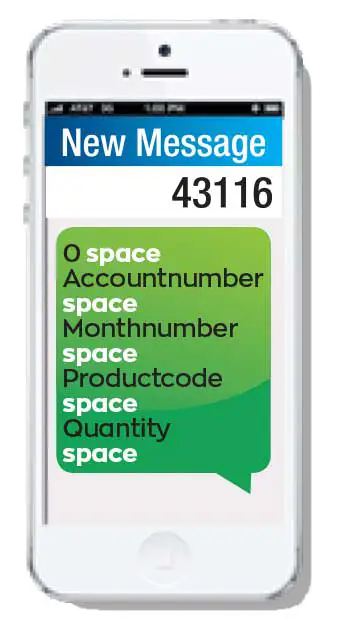
  • Start a new sms message on your phone
  • Type 43116 as the recipient
  • In the message body type the letter O (for order)
  • Type a space
  • Type your account number (example 12345678) & space
  • Type the campaign number (example 4 for April) & space
  • Type the product code & space
  • Type quantity needed for product code & space
  • Type next product code & space
  • Type quantity needed & space
  • Continue with pattern until all product codes & quantities are entered
  • Hit the send button on your phone
  • Wait for confirmation
how to order Avon by sms

Important things to check before sending your order

pink-check

Your account number

Make sure it’s correct

pink-check

The campaign number

Check it matches the current month

pink-check

Product codes & quantities

Double-check for typos

pink-check

Your cell number

It must be the one registered on your Avon account

Frequently Asked Questions

For South African Avon Representatives, SMS orders are sent to 43116. Standard SMS rates apply.

Start your order with 0, followed by your account number, campaign number, product code and quantity. Avon also states that O or 0 can be used to start an SMS order.

Yes. The information in the SMS needs to be separated by spaces.

Yes. After the campaign number, continue adding each product code followed by its quantity. Multi-part messages will still result in 1 order being placed on your account.

Check that your account number, campaign, product codes and quantities are correct. Also make sure you’re sending the SMS from the cellphone number registered to your Avon account.

You’ll receive a confirmation or error message on your cellphone after your SMS has been processed. It’s important to fix the errors before retrying the sms.

In the event that there was a mistake, no codes will be saved as a partial order. Resubmit the entire order from scratch. This will not cause any duplication.

SMS ordering is convenient, but because you manually enter product codes and quantities, mistakes can happen. If you accidentally press send before completing your order, the incomplete order may still be processed.

Yes, you can place your Avon order using the Avon mobile app or the Avon representative website. Note that you will need to have created a profile with a password to login to these tools.